Note
Go to the end to download the full example code. or to run this example in your browser via Binder
UplinkMACChannel Usage with Different Channel Types
This example demonstrates how to use the UplinkMACChannel class to simulate uplink communication scenarios with multiple users transmitting simultaneously. It demonstrates both shared channel and per-user channel configurations, and shows how to dynamically update channel parameters.
Key Features Demonstrated: - Using a single shared channel for all users - Using different channels for each user - Dynamic parameter updates during transmission - Signal visualization and analysis
import matplotlib.pyplot as plt
import numpy as np
import torch

from kaira.channels import AWGNChannel, FlatFadingChannel, RayleighFadingChannel, UplinkMACChannel

# Set random seed for reproducibility
torch.manual_seed(42)
np.random.seed(42)
Example 2: Different Channels per User
In this example, each user has a different channel, which is more realistic in scenarios where users are at different locations or experience different channel conditions.
# Create different channels for each user
user_channels = [AWGNChannel(avg_noise_power=0.1), FlatFadingChannel(fading_type="rayleigh", coherence_time=10, avg_noise_power=0.05), RayleighFadingChannel(coherence_time=5, avg_noise_power=0.15)]

# Create uplink MAC channel with per-user channels
uplink_channel_peruser = UplinkMACChannel(user_channels=user_channels, user_gains=[1.2, 1.0, 0.8], interference_power=0.1, combine_method="sum")  # Different gains

print(f"Per-user channel setup: {uplink_channel_peruser}")

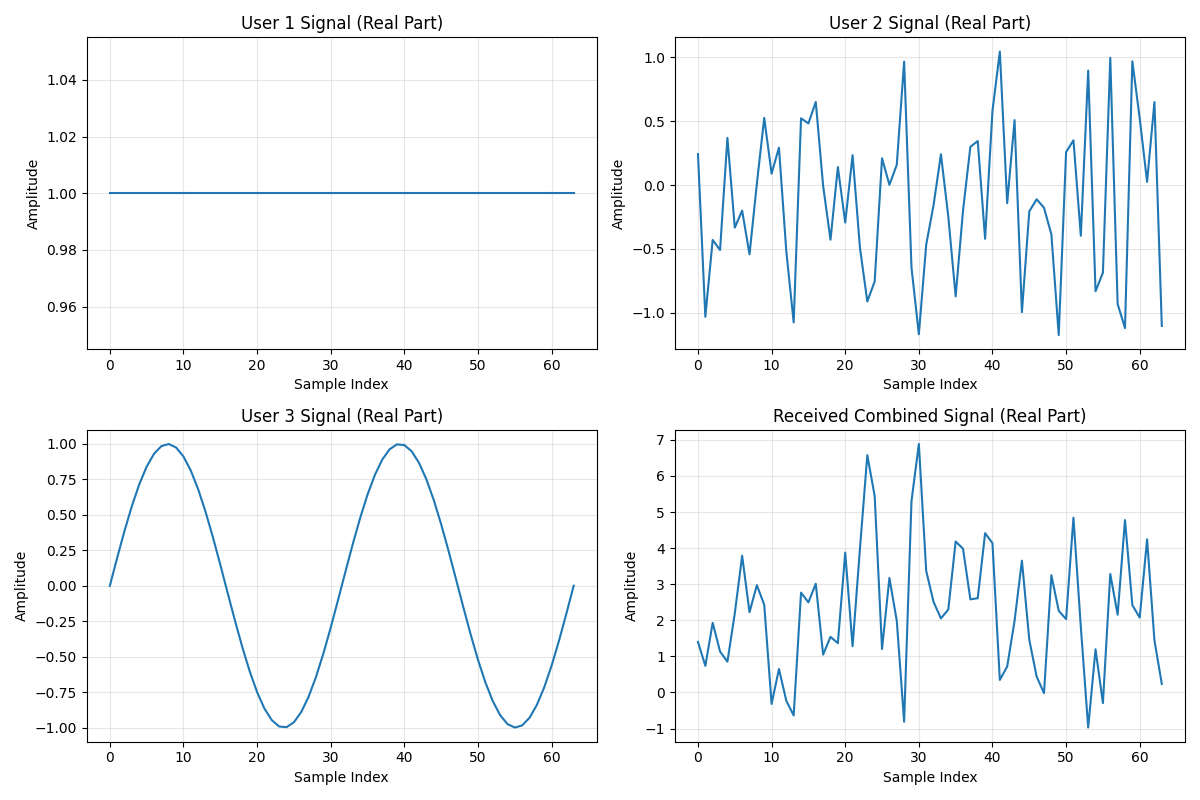
# Generate different test signals for each user
user_signals_peruser = [torch.ones(1, signal_length, dtype=torch.complex64), torch.randn(1, signal_length, dtype=torch.complex64), torch.sin(torch.linspace(0, 4 * np.pi, signal_length)).unsqueeze(0).to(torch.complex64)]  # User 1: constant signal  # User 2: random signal  # User 3: sinusoidal

# Process signals through the uplink channel
received_signal_peruser = uplink_channel_peruser(user_signals_peruser)

print(f"Input signal shapes: {[s.shape for s in user_signals_peruser]}")
print(f"Output signal shape: {received_signal_peruser.shape}")

# Show individual user CSI (if available)
for i in range(len(user_channels)):
    csi = uplink_channel_peruser.get_user_csi(i)
    print(f"User {i+1} CSI available: {csi is not None}")
Per-user channel setup: UplinkMACChannel(num_users=3, user_gains=[1.2000000476837158, 1.0, 0.800000011920929], interference_power=0.1, combine_method=sum)
Input signal shapes: [torch.Size([1, 64]), torch.Size([1, 64]), torch.Size([1, 64])]
Output signal shape: torch.Size([1, 64])
User 1 CSI available: False
User 2 CSI available: False
User 3 CSI available: False
Example 3: Dynamic Parameter Updates
The UplinkMACChannel allows dynamic updates of user gains and interference power during transmission, which is useful for adaptive systems.
# Create base channel for dynamic updates example
base_channel = AWGNChannel(avg_noise_power=0.1)
uplink_channel_dynamic = UplinkMACChannel(user_channels=base_channel, num_users=2, user_gains=[1.0, 1.0], interference_power=0.0, combine_method="sum")

# Generate test signals
user_signals_dynamic = [torch.ones(1, 32, dtype=torch.complex64), torch.ones(1, 32, dtype=torch.complex64) * 0.5]

# Process with original parameters
print("Original configuration:")
print(f"User gains: {uplink_channel_dynamic.user_gains.tolist()}")
print(f"Interference power: {uplink_channel_dynamic.interference_power}")

output1 = uplink_channel_dynamic(user_signals_dynamic)
power1 = torch.mean(torch.abs(output1) ** 2).item()
print(f"Output power: {power1:.4f}")

# Update user gain
uplink_channel_dynamic.update_user_gain(1, 2.0)  # Increase user 2's gain
print("\nAfter updating user 1 gain to 2.0:")
print(f"User gains: {uplink_channel_dynamic.user_gains.tolist()}")

output2 = uplink_channel_dynamic(user_signals_dynamic)
power2 = torch.mean(torch.abs(output2) ** 2).item()
print(f"Output power: {power2:.4f}")

# Update interference power
uplink_channel_dynamic.update_interference_power(0.2)
print("\nAfter adding interference (power=0.2):")
print(f"Interference power: {uplink_channel_dynamic.interference_power}")

output3 = uplink_channel_dynamic(user_signals_dynamic)
power3 = torch.mean(torch.abs(output3) ** 2).item()
print(f"Output power: {power3:.4f}")
Original configuration:
User gains: [1.0, 1.0]
Interference power: 0.0
Output power: 2.4552

After updating user 1 gain to 2.0:
User gains: [1.0, 2.0]
Output power: 3.8896

After adding interference (power=0.2):
Interference power: 0.2
Output power: 9.5622
Signal Visualization
Let’s visualize the signals from the per-user channel example to see how different user signals combine at the receiver.
plt.figure(figsize=(12, 8))

# Plot individual user signals (real part)
for i, signal in enumerate(user_signals_peruser):
    plt.subplot(2, 2, i + 1)
    plt.plot(signal[0].real.numpy())
    plt.title(f"User {i+1} Signal (Real Part)")
    plt.xlabel("Sample Index")
    plt.ylabel("Amplitude")
    plt.grid(True, alpha=0.3)

# Plot received signal (real part)
plt.subplot(2, 2, len(user_signals_peruser) + 1)
plt.plot(received_signal_peruser[0].real.numpy())
plt.title("Received Combined Signal (Real Part)")
plt.xlabel("Sample Index")
plt.ylabel("Amplitude")
plt.grid(True, alpha=0.3)

plt.tight_layout()
plt.show()
Power Analysis
Let’s analyze the power characteristics of different configurations
configurations = [("Shared Channel", received_signal_shared), ("Per-User Channels", received_signal_peruser), ("Dynamic Updates (Final)", output3)]

plt.figure(figsize=(10, 6))

config_names = []
powers = []

for name, signal in configurations:
    power = torch.mean(torch.abs(signal) ** 2).item()
    config_names.append(name)
    powers.append(power)
    print(f"{name}: Power = {power:.4f}")

# Create bar plot
plt.bar(config_names, powers, color=["skyblue", "lightcoral", "lightgreen"])
plt.title("Signal Power Comparison Across Configurations")
plt.ylabel("Average Signal Power")
plt.xticks(rotation=45, ha="right")
plt.grid(True, alpha=0.3, axis="y")

# Add value labels on bars
for i, v in enumerate(powers):
    plt.text(i, v + 0.01, f"{v:.3f}", ha="center", va="bottom")

plt.tight_layout()
plt.show()
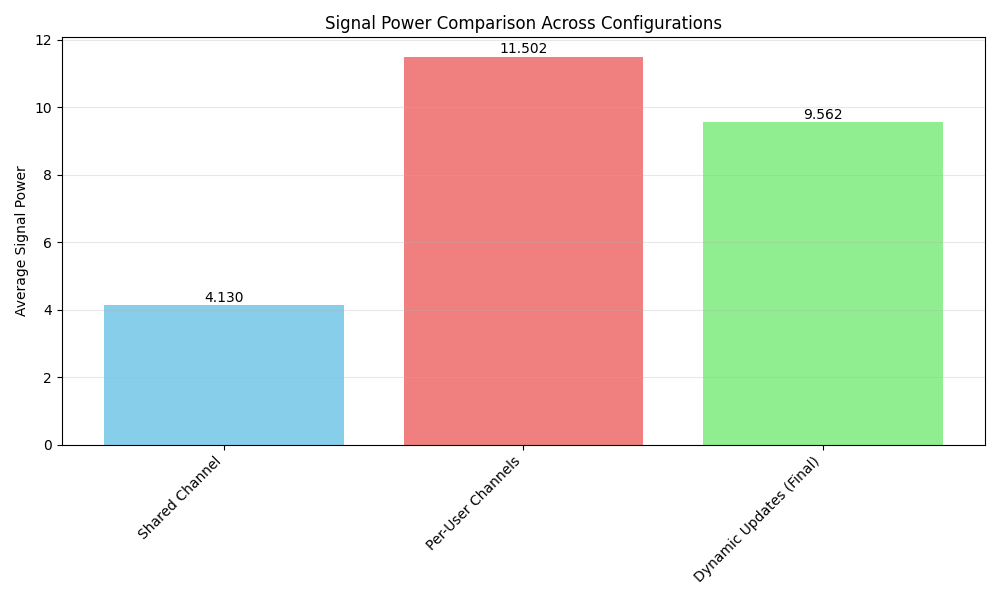
Shared Channel: Power = 4.1299
Per-User Channels: Power = 11.5017
Dynamic Updates (Final): Power = 9.5622
Conclusion
This example demonstrated the versatility of the UplinkMACChannel class:
Shared Channel Configuration: All users share the same channel model, useful for scenarios where users experience similar conditions
Per-User Channel Configuration: Each user has a different channel, enabling realistic modeling of diverse user environments
Dynamic Parameter Updates: Real-time adjustment of user gains and interference power for adaptive communication systems
Signal Analysis: Visualization and power analysis tools to understand the combined signal characteristics
Key observations: - Per-user channels provide more realistic modeling but require more computation - Dynamic updates enable adaptive systems that can respond to changing conditions - The UplinkMACChannel properly handles signal combining and CSI management - Different combining methods (“sum” vs “weighted_sum”) affect the output characteristics
