Note
Go to the end to download the full example code. or to run this example in your browser via Binder
Image Quality Metrics
This example demonstrates the image quality metrics available in Kaira, including PSNR (Peak Signal-to-Noise Ratio), SSIM (Structural Similarity Index), MS-SSIM (Multi-Scale SSIM), and LPIPS (Learned Perceptual Image Patch Similarity).
These metrics are particularly useful for: * Evaluating image compression algorithms * Assessing deep learning-based image processing * Quality control in image transmission systems
import os
from pathlib import Path

import matplotlib.pyplot as plt
First, let’s import the necessary modules
import torch
import torchvision.transforms as T
from PIL import Image

from kaira.metrics.image.lpips import LearnedPerceptualImagePatchSimilarity
from kaira.metrics.image.psnr import PeakSignalNoiseRatio
from kaira.metrics.image.ssim import MultiScaleSSIM, StructuralSimilarityIndexMeasure

# Sample images path - handle both script and interactive environments
try:
    SAMPLE_IMAGES_DIR = Path(__file__).parent / "sample_images"
except NameError:
    # Fallback for interactive environments
    SAMPLE_IMAGES_DIR = Path.cwd() / "sample_images"


def load_sample_images(num_images=4):
    """Load sample test images for demonstration."""
    transform = T.Compose(
        [
            T.Resize((256, 256)),
            T.ToTensor(),
        ]
    )

    images = []
    for img_file in sorted(SAMPLE_IMAGES_DIR.glob("*.png"))[:num_images]:
        # Handle both PNG and TIFF formats
        img = Image.open(str(img_file)).convert("RGB")
        images.append(transform(img))

    return torch.stack(images)


# Ensure test images are available
if not SAMPLE_IMAGES_DIR.exists() or not list(SAMPLE_IMAGES_DIR.glob("*.*")):
    raise RuntimeError("Test images not found. Please run:\n" + str(SAMPLE_IMAGES_DIR) + "\n" + "python scripts/download_test_images.py")

# Load sample images
images = load_sample_images(4)
Create different types of distortions
We’ll create different types of distortions to compare how various metrics assess them
def add_gaussian_noise(image, std=0.1):
    """Add Gaussian noise to image."""
    return image + torch.randn_like(image) * std


def add_salt_pepper_noise(image, prob=0.05):
    """Add salt and pepper noise to image."""
    mask = torch.rand_like(image)
    image = image.clone()
    image[mask < prob / 2] = 0  # salt
    image[mask > 1 - prob / 2] = 1  # pepper
    return image


def blur_image(image, kernel_size=3):
    """Apply Gaussian blur to image."""
    return T.GaussianBlur(kernel_size)(image)


def compress_image(image, quality=10):
    """Simulate JPEG compression artifacts."""
    to_pil = T.ToPILImage()
    to_tensor = T.ToTensor()
    pil_image = to_pil(image)
    # Create a temporary file for compression
    temp_file = "temp.jpg"
    pil_image.save(temp_file, quality=quality)
    try:
        compressed = Image.open(temp_file)
        return to_tensor(compressed)
    finally:
        if os.path.exists(temp_file):
            os.remove(temp_file)


# Create distorted versions
noisy_images = torch.stack([add_gaussian_noise(img) for img in images])
sp_noisy_images = torch.stack([add_salt_pepper_noise(img) for img in images])
blurred_images = torch.stack([blur_image(img) for img in images])
compressed_images = torch.stack([compress_image(img) for img in images])
Initialize metrics
We’ll create individual metrics directly without using the registry
# Initialize metrics manually
psnr = PeakSignalNoiseRatio(data_range=1.0, reduction="mean")  # or PSNR()
ssim = StructuralSimilarityIndexMeasure(data_range=1.0, reduction="mean")  # or SSIM()
ms_ssim = MultiScaleSSIM(data_range=1.0, reduction="mean")  # Add reduction parameter
lpips = LearnedPerceptualImagePatchSimilarity(net_type="alex")  # remove redundant reduction parameter
Downloading: "https://download.pytorch.org/models/alexnet-owt-7be5be79.pth" to /home/runner/.cache/torch/hub/checkpoints/alexnet-owt-7be5be79.pth

  0%|          | 0.00/233M [00:00<?, ?B/s]
  7%|▋         | 15.6M/233M [00:00<00:01, 164MB/s]
 21%|██▏       | 49.8M/233M [00:00<00:00, 278MB/s]
 36%|███▌      | 83.1M/233M [00:00<00:00, 310MB/s]
 51%|█████▏    | 120M/233M [00:00<00:00, 339MB/s]
 66%|██████▌   | 154M/233M [00:00<00:00, 348MB/s]
 82%|████████▏ | 191M/233M [00:00<00:00, 360MB/s]
 97%|█████████▋| 226M/233M [00:00<00:00, 318MB/s]
100%|██████████| 233M/233M [00:00<00:00, 319MB/s]
Evaluate metrics on different distortions
def evaluate_all_metrics(original, distorted):
    """Evaluate all metrics between original and distorted images."""
    return {"PSNR": psnr(distorted, original), "SSIM": ssim(distorted, original), "MS-SSIM": ms_ssim(distorted, original), "LPIPS": lpips(distorted, original)}  # Now returns scalar mean  # Now returns scalar mean  # Now returns scalar mean  # Now returns scalar mean


# Evaluate metrics for each type of distortion
gaussian_metrics = evaluate_all_metrics(images, noisy_images)
sp_metrics = evaluate_all_metrics(images, sp_noisy_images)
blur_metrics = evaluate_all_metrics(images, blurred_images)
compress_metrics = evaluate_all_metrics(images, compressed_images)
Visualize results
First, let’s look at the distorted images
plt.figure(figsize=(15, 8))
titles = ["Original", "Gaussian Noise", "Salt & Pepper", "Blur", "Compressed"]
all_images = [images, noisy_images, sp_noisy_images, blurred_images, compressed_images]

for i, (title, imgs) in enumerate(zip(titles, all_images)):
    plt.subplot(2, 3, i + 1)
    plt.imshow(imgs[0].permute(1, 2, 0).clip(0, 1))
    plt.title(title)
    plt.axis("off")

plt.tight_layout()
plt.show()
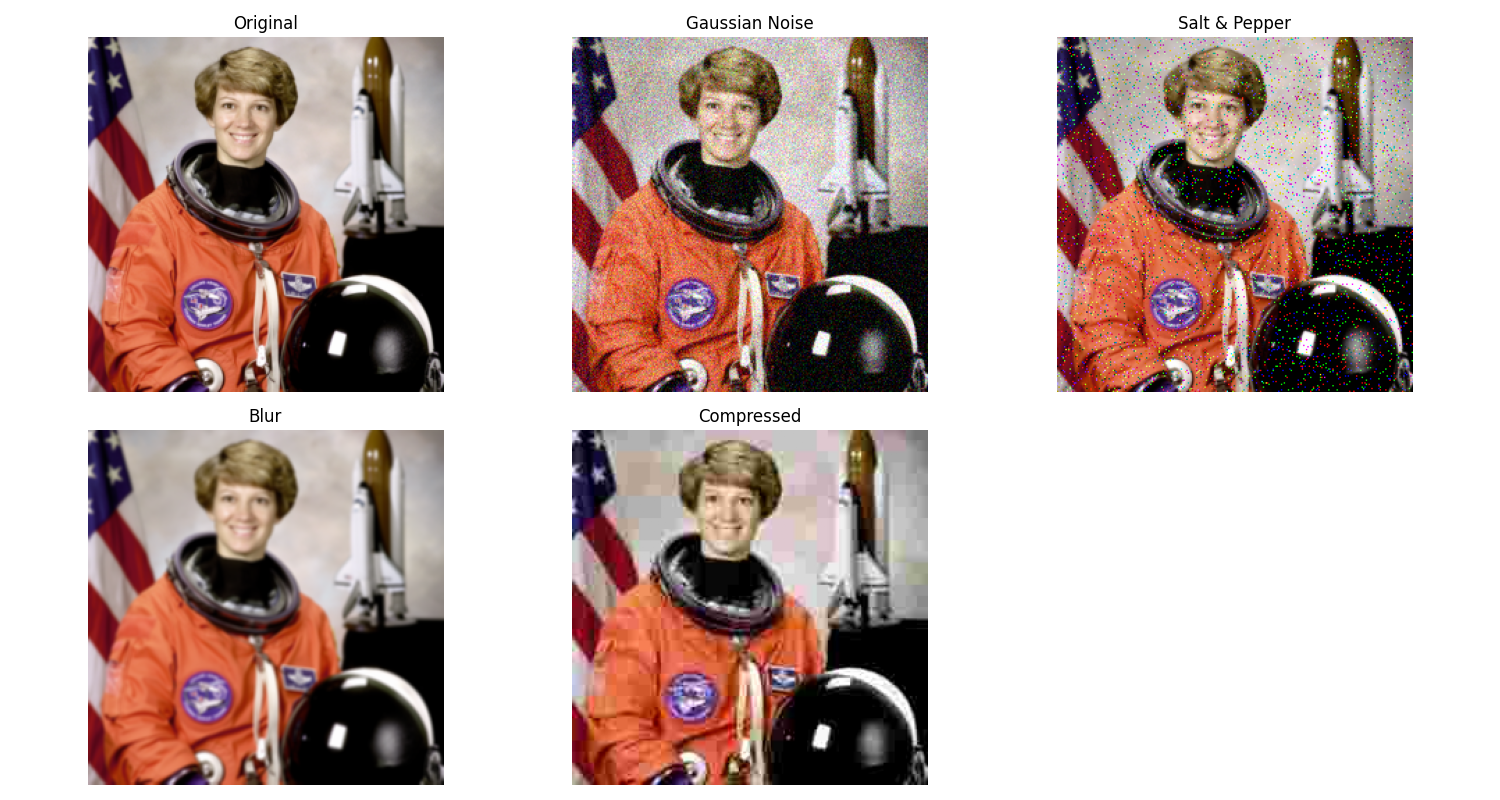
Now let’s compare how different metrics evaluate each distortion type
all_metrics = [gaussian_metrics, sp_metrics, blur_metrics, compress_metrics]

labels = ["Gaussian", "Salt & Pepper", "Blur", "Compression"]

# Create a manual comparison visualization
plt.figure(figsize=(14, 10))

# Plot PSNR values
plt.subplot(2, 2, 1)
psnr_values = [metrics["PSNR"].item() for metrics in all_metrics]  # Convert tensor to Python scalar
plt.bar(labels, psnr_values, color="blue")
plt.xlabel("Distortion Type")
plt.ylabel("PSNR (dB)")
plt.title("PSNR Comparison")
plt.grid(axis="y", alpha=0.3)

# Plot SSIM values
plt.subplot(2, 2, 2)
ssim_values = [metrics["SSIM"].item() for metrics in all_metrics]  # Convert tensor to Python scalar
plt.bar(labels, ssim_values, color="green")
plt.xlabel("Distortion Type")
plt.ylabel("SSIM")
plt.title("SSIM Comparison")
plt.grid(axis="y", alpha=0.3)

# Plot MS-SSIM values
plt.subplot(2, 2, 3)
msssim_values = [metrics["MS-SSIM"].item() for metrics in all_metrics]  # Convert tensor to Python scalar
plt.bar(labels, msssim_values, color="purple")
plt.xlabel("Distortion Type")
plt.ylabel("MS-SSIM")
plt.title("MS-SSIM Comparison")
plt.grid(axis="y", alpha=0.3)

# Plot LPIPS values (lower is better)
plt.subplot(2, 2, 4)
lpips_values = [metrics["LPIPS"].item() for metrics in all_metrics]  # Convert tensor to Python scalar
plt.bar(labels, lpips_values, color="red")
plt.xlabel("Distortion Type")
plt.ylabel("LPIPS (lower is better)")
plt.title("LPIPS Comparison")
plt.grid(axis="y", alpha=0.3)

plt.tight_layout()
plt.show()

Interpreting the Results
The results show how different metrics capture various aspects of image quality:
PSNR is a simple pixel-level metric that measures absolute differences * Higher values indicate better quality * More sensitive to noise than blurring * May not align well with human perception
SSIM considers structural information * Values range from -1 to 1 (higher is better) * More tolerant of uniform changes * Better correlation with human perception than PSNR
MS-SSIM evaluates structural similarity at multiple scales * Similar to SSIM but captures both local and global structures * Often preferred for high-resolution images * Better at detecting blur than basic SSIM
LPIPS uses deep features to measure perceptual similarity * Lower values indicate better perceptual quality * Trained on human perceptual judgments * Often best matches human quality assessment
Different distortions affect these metrics differently:
Gaussian noise heavily impacts PSNR but less so SSIM
Blur might maintain good PSNR but show poor SSIM/MS-SSIM
LPIPS often identifies perceptually significant distortions that other metrics might miss
For practical applications:
Use multiple metrics for comprehensive evaluation
Consider the specific requirements of your application
LPIPS is recommended when perceptual quality is critical
PSNR/SSIM are good for optimization objectives due to their mathematical properties
Total running time of the script: (0 minutes 2.822 seconds)
