Note
Go to the end to download the full example code. or to run this example in your browser via Binder
Metrics Registry
This example demonstrates the usage of the metrics registry in Kaira, which provides a central location for registering, managing, and retrieving metrics.
import matplotlib.pyplot as plt
First, let’s import the necessary modules
import numpy as np
import torch

from kaira.metrics import BaseMetric
from kaira.metrics.registry import MetricRegistry
from kaira.metrics.signal import BER, SNR  # Import from the signal submodule instead

# Set random seed for reproducibility
torch.manual_seed(42)
np.random.seed(42)
1. Basic Registry Usage
Create a new registry instance for our examples
# Clear existing registrations and register new metric classes
MetricRegistry._metrics.clear()  # Clear existing registrations
MetricRegistry.register("ber", BER)
MetricRegistry.register("snr", SNR)

# Print available metrics
print("Available metrics:")
for name in MetricRegistry.list_metrics():
    print(f"  - {name}")
Available metrics:
  - ber
  - snr
2. Using Registered Metrics
Generate test data and use a registered metric
n_bits = 1000
bits = torch.randint(0, 2, (1, n_bits))
# Introduce some errors (5% error rate)
error_probability = 0.05
errors = torch.rand(1, n_bits) < error_probability
received_bits = torch.logical_xor(bits, errors).int()

# Create a metric instance from the registry
ber_metric = MetricRegistry.create("ber")
ber_value = ber_metric(received_bits, bits)
print(f"\nMeasured BER: {ber_value.item():.5f}")
Measured BER: 0.04000
3. Creating and Registering Custom Metrics
Define a custom metric
class BitsPerSecond(BaseMetric):
    """Metric to calculate bits per second throughput."""

    def __init__(self, name=None):
        super().__init__(name=name)

    def forward(self, num_bits, time_seconds):
        """Calculate bits per second.

        Args:
            num_bits (torch.Tensor): Number of bits transmitted
            time_seconds (torch.Tensor): Time in seconds

        Returns:
            torch.Tensor: Bits per second
        """
        # Ensure time is not zero
        time_seconds = torch.clamp(time_seconds, min=1e-6)
        return num_bits / time_seconds


# Register the custom metric class with a unique name
MetricRegistry.register("throughput", BitsPerSecond)

# Test the custom metric
bits_transmitted = torch.tensor([1000.0])
transmission_time = torch.tensor([0.1])  # 0.1 seconds

# Create an instance and use it
throughput_metric = MetricRegistry.create("throughput")
throughput = throughput_metric(bits_transmitted, transmission_time)
print(f"\nThroughput: {throughput.item():.1f} bits per second")
Throughput: 10000.0 bits per second
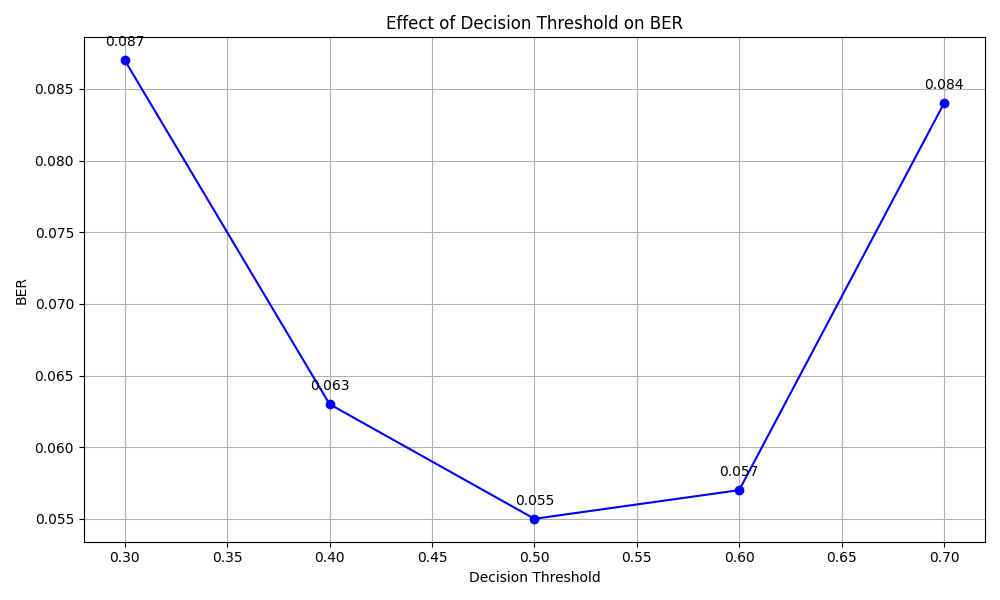
4. Parameterized Metrics
Create metrics with different parameters
class ParameterizedBER(BER):
    """BER metric with a threshold parameter."""

    def __init__(self, threshold=0.5, name=None):
        super().__init__(name=name)
        self.threshold = threshold

    def forward(self, y_pred, y_true):
        """Apply threshold before calculating BER."""
        thresholded_pred = (y_pred > self.threshold).float()
        return super().forward(thresholded_pred, y_true)


# Register the parameterized metric class
MetricRegistry.register("param_ber", ParameterizedBER)

# Generate soft decisions for testing
n_bits = 1000
true_bits = torch.randint(0, 2, (1, n_bits))
noise = 0.3 * torch.randn(1, n_bits)
soft_bits = true_bits.float() + noise

# Test different thresholds
thresholds = [0.3, 0.4, 0.5, 0.6, 0.7]
ber_values = []

for threshold in thresholds:
    # Create a new metric instance for each threshold
    metric = MetricRegistry.create("param_ber", threshold=threshold)
    ber_values.append(metric(soft_bits, true_bits).item())

# Visualize the effect of threshold
plt.figure(figsize=(10, 6))
plt.plot(thresholds, ber_values, "bo-")
plt.grid(True)
plt.xlabel("Decision Threshold")
plt.ylabel("BER")
plt.title("Effect of Decision Threshold on BER")

# Add data points with labels
for i, (x, y) in enumerate(zip(thresholds, ber_values)):
    plt.annotate(f"{y:.3f}", (x, y), textcoords="offset points", xytext=(0, 10), ha="center")

plt.tight_layout()
plt.show()
5. Evaluating Multiple Metrics
Create a framework to evaluate multiple metrics
class SystemEvaluator:
    """Framework for evaluating communication system performance."""

    def __init__(self):
        """Initialize the evaluator."""
        self.metrics = {}

    def register_metric(self, name, metric):
        """Register a new metric instance."""
        if name in self.metrics:
            print(f"Warning: Overwriting existing metric '{name}'")
        self.metrics[name] = metric

    def evaluate_all(self, **kwargs):
        """Evaluate all registered metrics with the given inputs."""
        results = {}
        for name, metric in self.metrics.items():
            # Get expected arguments for this metric
            args = getattr(metric, "get_expected_args", lambda: [])()
            if not args:  # If no specific args defined, try common patterns
                if "received_bits" in kwargs and "true_bits" in kwargs:
                    args = ["received_bits", "true_bits"]
                elif "time_seconds" in kwargs and "num_bits" in kwargs:
                    args = ["num_bits", "time_seconds"]

            if args:
                # Extract relevant arguments
                metric_args = [kwargs[arg] for arg in args if arg in kwargs]
                if len(metric_args) == len(args):
                    results[name] = metric(*metric_args)

        return results


# Add method to help identify expected arguments
def get_expected_args(self):
    """Return expected argument names for the metric."""
    if isinstance(self, BER):
        return ["received_bits", "true_bits"]
    elif isinstance(self, BitsPerSecond):
        return ["num_bits", "time_seconds"]
    else:
        return []


# Add method to BaseMetric class
BaseMetric.get_expected_args = get_expected_args

# Create evaluator and register metrics
evaluator = SystemEvaluator()
evaluator.register_metric("system_ber", MetricRegistry.create("ber"))
evaluator.register_metric("system_throughput", MetricRegistry.create("throughput"))

# Prepare test data
true_bits = torch.randint(0, 2, (1, 1000))
received_bits = true_bits.clone()
error_mask = torch.rand(1, 1000) < 0.05  # 5% error rate
received_bits = torch.logical_xor(received_bits, error_mask).int()

# Transmission parameters
transmission_time = torch.tensor([0.1])  # seconds
num_bits = torch.tensor([1000.0])  # number of bits

# Evaluate all metrics
results = evaluator.evaluate_all(true_bits=true_bits, received_bits=received_bits, time_seconds=transmission_time, num_bits=num_bits)

# Print results
print("\nSystem Evaluation Results:")
for name, value in results.items():
    print(f"{name}: {value.item():.5f}")
System Evaluation Results:
system_ber: 0.05300
system_throughput: 10000.00000
6. Dynamic Metric Creation
Create and register metrics dynamically
def create_scaled_metric_class(base_metric_class, scale_factor):
    """Create a metric class that scales its result by a factor."""

    class ScaledMetric(base_metric_class):
        """A scaled version of the base metric.

        Multiplies the output of the base metric by a scaling factor.
        Inherits all functionality from the base metric class.

        Args:
            *args: Variable length argument list passed to base metric.
            **kwargs: Arbitrary keyword arguments passed to base metric.
        """

        def forward(self, *args, **kwargs):
            """Apply scaling to the base metric's output.

            Args:
                *args: Variable length argument list passed to base metric.
                **kwargs: Arbitrary keyword arguments passed to base metric.

            Returns:
                torch.Tensor: Scaled metric value (base metric output * scale_factor)
            """
            return super().forward(*args, **kwargs) * scale_factor

    return ScaledMetric


# Create and register metrics with different scale factors
for scale in [0.5, 1.0, 2.0]:
    metric_name = f"scaled_ber_{scale}"
    # Create a scaled metric class for each scale factor
    scaled_metric_class = create_scaled_metric_class(BER, scale)
    MetricRegistry.register(metric_name, scaled_metric_class)

# Test the scaled metrics
scales = [0.5, 1.0, 2.0]
results = []

for scale in scales:
    metric_name = f"scaled_ber_{scale}"
    # Create an instance from the registered class
    metric = MetricRegistry.create(metric_name)
    result = metric(received_bits, true_bits)
    results.append(result.item())
    print(f"{metric_name}: {result.item():.5f}")

# Visualize scaling effects
plt.figure(figsize=(8, 5))
plt.bar(scales, results)
plt.grid(axis="y", alpha=0.3)
plt.xlabel("Scale Factor")
plt.ylabel("Scaled BER")
plt.title("Effect of Scaling on BER")

# Add value labels
for i, (x, y) in enumerate(zip(scales, results)):
    plt.text(x, y + 0.001, f"{y:.5f}", ha="center", va="bottom")

plt.tight_layout()
plt.show()

scaled_ber_0.5: 0.02650
scaled_ber_1.0: 0.05300
scaled_ber_2.0: 0.10600
Conclusion
This example demonstrated:
Basic usage of the metrics registry
Creating and registering custom metrics
Creating parameterized metrics for different scenarios
Building evaluation frameworks
Dynamic metric creation and registration
The metrics registry provides a flexible way to:
Centralize metric management
Create parameterized variations of metrics
Dynamically generate metrics
Build evaluation frameworks
