Note
Go to the end to download the full example code. or to run this example in your browser via Binder
Channel-Aware Base Model Example
This example demonstrates the usage of the ChannelAwareBaseModel abstract base class, which standardizes how Channel State Information (CSI) is handled across different models in the Kaira framework.
The ChannelAwareBaseModel provides: - Standardized CSI validation and normalization - Utility methods for CSI transformation - Helper functions for passing CSI to submodules - Consistent interface for channel-aware models
import matplotlib.pyplot as plt
import numpy as np
import torch
import torch.nn as nn

from kaira.channels import AWGNChannel, FlatFadingChannel
from kaira.models.base import ChannelAwareBaseModel
from kaira.models.components import AFModule
Creating a Simple Channel-Aware Model
Let’s create a simple model that extends ChannelAwareBaseModel to demonstrate the standardized CSI handling capabilities.
class SimpleChannelAwareEncoder(ChannelAwareBaseModel):
    """A simple encoder that demonstrates ChannelAwareBaseModel usage."""

    def __init__(self, input_dim: int, output_dim: int, csi_dim: int):
        super().__init__()
        self.input_dim = input_dim
        self.output_dim = output_dim
        self.csi_dim = csi_dim

        # Feature extraction layers
        self.feature_extractor = nn.Sequential(nn.Linear(input_dim, 128), nn.ReLU(), nn.Linear(128, 64), nn.ReLU())

        # CSI processing
        self.csi_processor = nn.Sequential(nn.Linear(csi_dim, 32), nn.ReLU(), nn.Linear(32, 16))

        # Fusion and output
        self.fusion = nn.Sequential(nn.Linear(64 + 16, output_dim), nn.Tanh())

    def forward(self, x: torch.Tensor, csi: torch.Tensor, *args, **kwargs) -> torch.Tensor:
        """Forward pass with explicit CSI parameter."""
        # Validate CSI first
        csi = self.validate_csi(csi)

        # Extract features from input
        features = self.feature_extractor(x)

        # Process CSI - ensure it's the right shape for our processor
        if csi.dim() == 1:
            csi = csi.unsqueeze(0)  # Add batch dimension if needed

        # Transform CSI to expected shape if needed
        target_csi_shape = torch.Size([csi.shape[0], self.csi_dim])
        csi_transformed = self.transform_csi(csi, target_csi_shape)

        # Process CSI
        csi_features = self.csi_processor(csi_transformed)

        # Fuse features and CSI
        fused = torch.cat([features, csi_features], dim=-1)

        # Generate output
        output = self.fusion(fused)

        return output


# Create the model
input_dim = 32
output_dim = 16
csi_dim = 2
model = SimpleChannelAwareEncoder(input_dim, output_dim, csi_dim)

# Created SimpleChannelAwareEncoder:
# Input dimension: {input_dim}
# Output dimension: {output_dim}
# CSI dimension: {csi_dim}
Demonstrating CSI Validation and Normalization
The ChannelAwareBaseModel provides several utility methods for handling CSI.
# Create sample data
batch_size = 8
x = torch.randn(batch_size, input_dim)

# Different CSI examples
# Valid CSI
csi_valid = torch.tensor([[10.0, 0.5], [15.0, 0.8], [5.0, 0.3], [20.0, 0.9], [12.0, 0.6], [8.0, 0.4], [18.0, 0.7], [14.0, 0.65]])
# Valid CSI shape: {csi_valid.shape}

try:
    validated_csi = model.validate_csi(csi_valid)
    print("✓ CSI validation passed")
except ValueError as e:
    # ✗ CSI validation failed due to value error
    print("✗ CSI validation failed: " + str(e))
    validated_csi = None
except Exception as e:
    # ✗ CSI validation failed due to unexpected error
    print("✗ Unexpected error during CSI validation: " + str(e))
    validated_csi = None

# Test normalization
# MinMax normalization
normalized_minmax = model.normalize_csi(csi_valid, method="minmax", target_range=(0, 1))
# Original CSI range: [{csi_valid.min():.2f}, {csi_valid.max():.2f}]
# MinMax normalized range: [{normalized_minmax.min():.2f}, {normalized_minmax.max():.2f}]

# Z-score normalization
normalized_zscore = model.normalize_csi(csi_valid, method="zscore")
# Z-score normalized mean: {normalized_zscore.mean():.4f}, std: {normalized_zscore.std():.4f}
✓ CSI validation passed
Working with the AFModule
The AFModule has been updated to use ChannelAwareBaseModel. Let’s demonstrate its usage.
# Create AFModule
N = 64  # Number of feature channels
csi_length = 1  # CSI vector length
af_module = AFModule(N=N, csi_length=csi_length)

# Create feature maps (4D tensor for image-like data)
feature_maps = torch.randn(batch_size, N, 8, 8)
# Feature maps shape: {feature_maps.shape}

# Create CSI for AFModule (SNR values in dB)
snr_values = torch.tensor([10.0, 15.0, 5.0, 20.0, 12.0, 8.0, 18.0, 14.0])
csi_af = snr_values.unsqueeze(1)  # Shape: [batch_size, 1]
# CSI shape for AFModule: {csi_af.shape}

# Apply AFModule
with torch.no_grad():
    modulated_features = af_module(feature_maps, csi=csi_af)

# Modulated features shape: {modulated_features.shape}
# Feature modulation factor range: [{(modulated_features/feature_maps).min():.3f}, {(modulated_features/feature_maps).max():.3f}]
CSI Feature Extraction
The base class provides methods to extract useful features from CSI.
csi_features = model.extract_csi_features(csi_valid)
# Extracted CSI features:
for feature_name, feature_value in csi_features.items():
    if isinstance(feature_value, torch.Tensor):
        if feature_value.numel() == 1:
            # Single-value feature: {feature_name}: {feature_value.item():.4f}
            pass
        else:
            # Multi-value feature: {feature_name}: {feature_value.tolist()}
            pass
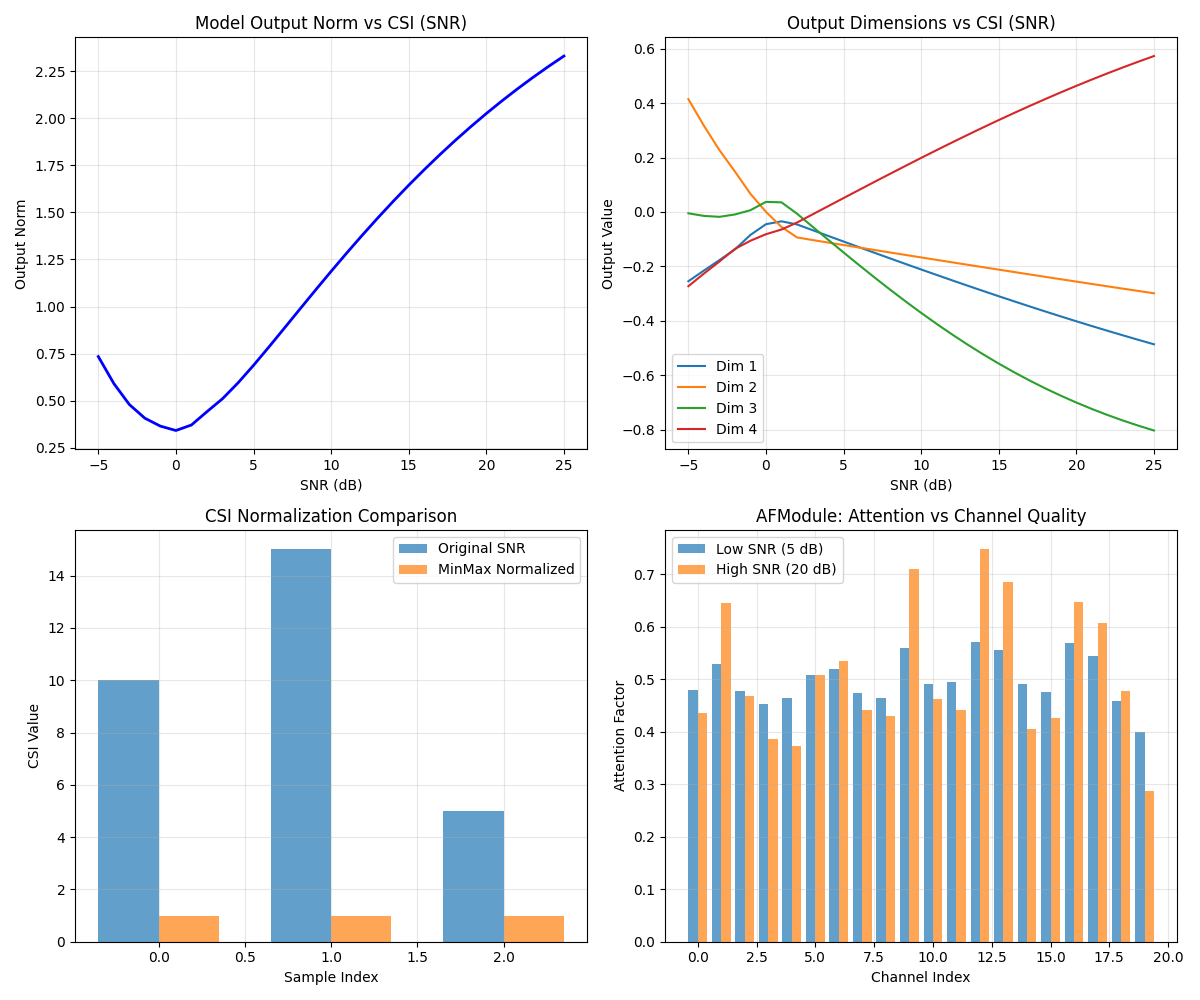
Visualization of CSI Effects
Let’s visualize how different CSI values affect model outputs.
# Generate a range of CSI values
snr_range = torch.linspace(-5, 25, 31)  # SNR from -5 to 25 dB
quality_factor = torch.ones_like(snr_range) * 0.5  # Fixed quality factor

# Create input data
test_input = torch.randn(1, input_dim)

# Test model with different CSI values
outputs_list = []
model.eval()

with torch.no_grad():
    for snr in snr_range:
        csi_test = torch.tensor([[snr.item(), 0.5]])
        output = model(test_input, csi=csi_test)
        outputs_list.append(output.squeeze().numpy())

outputs: np.ndarray = np.array(outputs_list)

# Create visualization
fig, axes = plt.subplots(2, 2, figsize=(12, 10))

# Plot 1: Output norm vs SNR
output_norms = np.linalg.norm(outputs, axis=1)
axes[0, 0].plot(snr_range.numpy(), output_norms, "b-", linewidth=2)
axes[0, 0].set_xlabel("SNR (dB)")
axes[0, 0].set_ylabel("Output Norm")
axes[0, 0].set_title("Model Output Norm vs CSI (SNR)")
axes[0, 0].grid(True, alpha=0.3)

# Plot 2: First few output dimensions vs SNR
actual_output_dim = outputs.shape[1] if outputs.ndim > 1 else 1
for i in range(min(4, actual_output_dim)):
    axes[0, 1].plot(snr_range.numpy(), outputs[:, i], label="Dim " + str(i + 1))
axes[0, 1].set_xlabel("SNR (dB)")
axes[0, 1].set_ylabel("Output Value")
axes[0, 1].set_title("Output Dimensions vs CSI (SNR)")
axes[0, 1].legend()
axes[0, 1].grid(True, alpha=0.3)

# Plot 3: CSI normalization comparison
csi_sample = torch.tensor([[10.0, 0.5], [15.0, 0.8], [5.0, 0.3]])
csi_minmax = model.normalize_csi(csi_sample, method="minmax").numpy()
csi_zscore = model.normalize_csi(csi_sample, method="zscore").numpy()

x_pos = np.arange(len(csi_sample))
width = 0.35

axes[1, 0].bar(x_pos - width / 2, csi_sample[:, 0], width, label="Original SNR", alpha=0.7)
axes[1, 0].bar(x_pos + width / 2, csi_minmax[:, 0], width, label="MinMax Normalized", alpha=0.7)
axes[1, 0].set_xlabel("Sample Index")
axes[1, 0].set_ylabel("CSI Value")
axes[1, 0].set_title("CSI Normalization Comparison")
axes[1, 0].legend()
axes[1, 0].grid(True, alpha=0.3)

# Plot 4: AFModule attention effects
# Create different CSI values for comparison
csi_low = torch.tensor([[5.0]])  # Low SNR
csi_high = torch.tensor([[20.0]])  # High SNR

# Sample feature map
sample_features = torch.randn(1, N, 4, 4)

with torch.no_grad():
    features_low_snr = af_module(sample_features, csi=csi_low)
    features_high_snr = af_module(sample_features, csi=csi_high)

# Calculate attention effect (ratio of output to input)
attention_low = (features_low_snr / sample_features).mean(dim=(2, 3)).squeeze()
attention_high = (features_high_snr / sample_features).mean(dim=(2, 3)).squeeze()

channel_indices = np.arange(min(20, N))  # Show first 20 channels
axes[1, 1].bar(channel_indices - 0.2, attention_low[: len(channel_indices)], 0.4, label="Low SNR (5 dB)", alpha=0.7)
axes[1, 1].bar(channel_indices + 0.2, attention_high[: len(channel_indices)], 0.4, label="High SNR (20 dB)", alpha=0.7)
axes[1, 1].set_xlabel("Channel Index")
axes[1, 1].set_ylabel("Attention Factor")
axes[1, 1].set_title("AFModule: Attention vs Channel Quality")
axes[1, 1].legend()
axes[1, 1].grid(True, alpha=0.3)

plt.tight_layout()
plt.show()
Integration with Channels
Demonstrate how to extract and use CSI from channel outputs.
# Create channels that might provide CSI
awgn_channel = AWGNChannel(snr_db=15.0)
fading_channel = FlatFadingChannel(fading_type="rayleigh", coherence_time=50, snr_db=10.0)

# Simulate transmission
test_signal = torch.randn(batch_size, 32) + 1j * torch.randn(batch_size, 32)

# Process through channels
awgn_output = awgn_channel(test_signal)
fading_output = fading_channel(test_signal)

# AWGN channel output shape: {awgn_output.shape}
# Fading channel output shape: {fading_output.shape}

# Try to extract CSI (channels might not provide it directly)
awgn_csi = model.extract_csi_from_channel_output(awgn_output)
fading_csi = model.extract_csi_from_channel_output(fading_output)

# Extracted CSI from AWGN: {awgn_csi}
# Extracted CSI from Fading: {fading_csi}

# Create CSI manually based on channel properties
if hasattr(awgn_channel, "snr_db"):
    manual_awgn_csi = torch.full((batch_size, 1), awgn_channel.snr_db)
    print("Manual AWGN CSI: " + str(manual_awgn_csi.mean().item()) + " dB")

if hasattr(fading_channel, "snr_db"):
    manual_fading_csi = torch.full((batch_size, 1), fading_channel.snr_db)
    print("Manual Fading CSI: " + str(manual_fading_csi.mean().item()) + " dB")
Manual AWGN CSI: 15.0 dB
Manual Fading CSI: 10.0 dB
Best Practices Summary
print("\n=== Best Practices for ChannelAwareBaseModel ===")
print(
    """
1. Always validate CSI using validate_csi() method
2. Normalize CSI values for consistent model behavior
3. Use transform_csi() to adapt CSI to required shapes
4. Extract features from CSI for analysis and debugging
5. Pass CSI explicitly to submodules using forward_csi_to_submodules()
6. Handle CSI gracefully when extracting from channel outputs
7. Document expected CSI format and range in model docstrings

Example CSI formats:
- SNR in dB: torch.tensor([[10.0], [15.0], [20.0]])
- Multiple indicators: torch.tensor([[snr, quality, gain], ...])
- Complex CSI: torch.tensor([[real, imag], ...])
"""
)

print("Example completed successfully!")
=== Best Practices for ChannelAwareBaseModel ===

1. Always validate CSI using validate_csi() method
2. Normalize CSI values for consistent model behavior
3. Use transform_csi() to adapt CSI to required shapes
4. Extract features from CSI for analysis and debugging
5. Pass CSI explicitly to submodules using forward_csi_to_submodules()
6. Handle CSI gracefully when extracting from channel outputs
7. Document expected CSI format and range in model docstrings

Example CSI formats:
- SNR in dB: torch.tensor([[10.0], [15.0], [20.0]])
- Multiple indicators: torch.tensor([[snr, quality, gain], ...])
- Complex CSI: torch.tensor([[real, imag], ...])

Example completed successfully!
