Note
Go to the end to download the full example code. or to run this example in your browser via Binder
Pulse Amplitude Modulation (PAM)
This example demonstrates the usage of Pulse Amplitude Modulation (PAM) in the Kaira library. We’ll explore different PAM orders and analyze their performance characteristics.
import matplotlib.pyplot as plt
Imports and Setup
import numpy as np
import torch

from kaira.channels import AWGNChannel
from kaira.metrics.signal import BER
from kaira.modulations import PAMDemodulator, PAMModulator
from kaira.utils import snr_to_noise_power

# Set random seed for reproducibility
torch.manual_seed(42)
np.random.seed(42)
Create PAM Modulators with Different Orders
pam_orders: list[int] = [2, 4, 8, 16]  # PAM-2 through PAM-16
n_symbols = 1000

modulators: dict[int, PAMModulator] = {order: PAMModulator(order=order) for order in pam_orders}  # type: ignore
demodulators: dict[int, PAMDemodulator] = {order: PAMDemodulator(order=order) for order in pam_orders}  # type: ignore

# Generate random bits for each PAM order
bits_per_symbol = {order: int(np.log2(order)) for order in pam_orders}
input_bits = {}
modulated_symbols = {}

for order in pam_orders:
    n_bits = bits_per_symbol[order] * n_symbols
    input_bits[order] = torch.randint(0, 2, (1, n_bits))
    modulated_symbols[order] = modulators[order](input_bits[order])
Visualize PAM Constellations
plt.figure(figsize=(15, 5))
for i, order in enumerate(pam_orders):
    # Ensure we're working with real values
    symbols = modulated_symbols[order].real.numpy().flatten() if torch.is_complex(modulated_symbols[order]) else modulated_symbols[order].numpy().flatten()

    plt.subplot(1, 4, i + 1)
    plt.scatter(np.zeros_like(symbols), symbols, alpha=0.5)
    plt.title(f"PAM-{order} Constellation")
    plt.grid(True)
    plt.xlabel("Real")
    plt.ylabel("Amplitude")

    # Add horizontal lines at constellation points
    unique_levels = np.unique(symbols)
    for level in unique_levels:
        plt.axhline(y=level, color="r", linestyle="--", alpha=0.2)
plt.tight_layout()
plt.show()

Simulate Transmission over AWGN Channel
snr_db_range = np.arange(0, 26, 2)
ber_results: dict[int, list[float]] = {order: [] for order in pam_orders}

# Initialize BER metric
ber_metric = BER()

for snr_db in snr_db_range:
    noise_power = snr_to_noise_power(1.0, snr_db)
    channel = AWGNChannel(avg_noise_power=noise_power)

    for order in pam_orders:
        # Transmit through channel
        received = channel(modulated_symbols[order])

        # Demodulate
        demod_bits = demodulators[order](received)

        # Calculate BER
        ber = ber_metric(demod_bits, input_bits[order]).item()
        ber_results[order].append(ber)
Plot BER vs SNR Performance
plt.figure(figsize=(10, 6))

colors = ["b", "r", "g", "m"]
for order, color in zip(pam_orders, colors):
    plt.semilogy(snr_db_range, ber_results[order], f"{color}o-", label=f"PAM-{order}")

plt.grid(True)
plt.xlabel("SNR (dB)")
plt.ylabel("Bit Error Rate (BER)")
plt.title("BER Performance of Different PAM Orders")
plt.legend()
plt.show()

Visualize Effect of Noise on PAM-8
test_snr_db = [20.0, 10.0, 5.0]
n_test_symbols = 1000
pam8_mod = modulators[8]
plt.figure(figsize=(15, 5))
# Generate random PAM-8 symbols
test_bits = torch.randint(0, 2, (1, 3 * n_test_symbols))  # 3 bits per symbol for PAM-8
pam8_symbols = pam8_mod(test_bits)
for i, snr_db_value in enumerate(test_snr_db):
    noise_power = snr_to_noise_power(1.0, float(snr_db_value))
    channel = AWGNChannel(avg_noise_power=noise_power)

    # Pass through noisy channel
    received_symbols = channel(pam8_symbols)

    # Explicitly take real part for histogram
    hist_values = received_symbols.real if torch.is_complex(received_symbols) else received_symbols

    plt.subplot(1, 3, i + 1)
    plt.hist(hist_values.numpy().flatten(), bins=50, density=True)
    plt.title(f"PAM-8 Reception at {snr_db} dB SNR")
    plt.xlabel("Amplitude")
    plt.ylabel("Density")
    plt.grid(True)

    # Add vertical lines at ideal constellation points
    ideal_points = pam8_mod.constellation.real if torch.is_complex(pam8_mod.constellation) else pam8_mod.constellation
    ideal_points = ideal_points.numpy()
    for point in ideal_points:
        plt.axvline(x=point, color="r", linestyle="--", alpha=0.5)
plt.tight_layout()
plt.show()

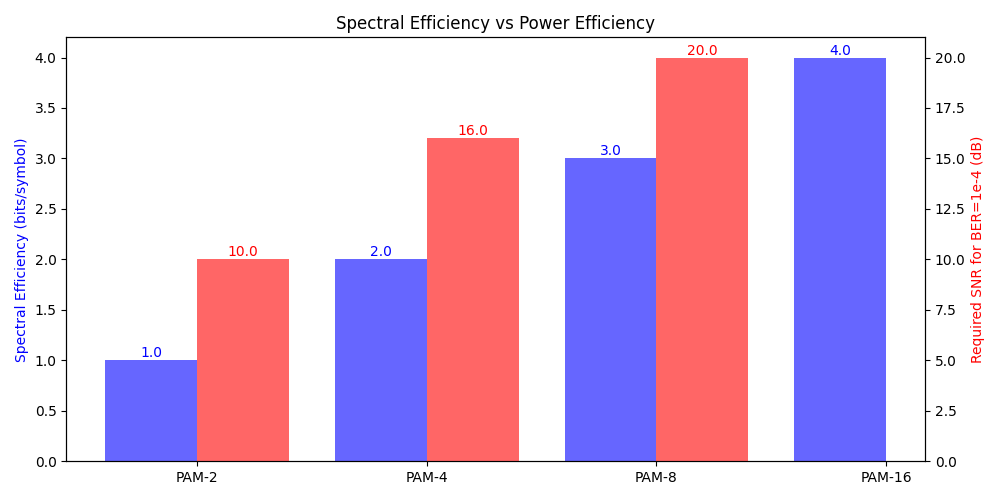
Compare Spectral Efficiency vs Power Efficiency
plt.figure(figsize=(10, 5))

# Calculate spectral efficiency (bits/symbol)
spectral_efficiency = [np.log2(order) for order in pam_orders]

# Create a comparison plot
ax1 = plt.gca()
ax2 = ax1.twinx()

# Plot spectral efficiency
bars = ax1.bar([i - 0.2 for i in range(len(pam_orders))], spectral_efficiency, width=0.4, color="b", alpha=0.6, label="Spectral Efficiency")
ax1.set_ylabel("Spectral Efficiency (bits/symbol)", color="b")

# Plot required SNR for BER = 1e-4 (approximate from BER curves)
target_ber = 1e-4
required_snr = []
for order in pam_orders:
    ber_array = np.array(ber_results[order])
    snr_idx = np.argmin(np.abs(ber_array - target_ber))
    if snr_idx == len(snr_db_range) - 1:  # If target BER not reached
        required_snr.append(np.nan)
    else:
        required_snr.append(snr_db_range[snr_idx])

ax2.bar([i + 0.2 for i in range(len(pam_orders))], required_snr, width=0.4, color="r", alpha=0.6, label="Required SNR")
ax2.set_ylabel("Required SNR for BER=1e-4 (dB)", color="r")

plt.xticks(range(len(pam_orders)), [f"PAM-{order}" for order in pam_orders])
plt.title("Spectral Efficiency vs Power Efficiency")

# Add value labels
for i, v in enumerate(spectral_efficiency):
    ax1.text(i - 0.2, v, f"{v:.1f}", ha="center", va="bottom", color="b")
for i, v in enumerate(required_snr):
    if not np.isnan(v):
        ax2.text(i + 0.2, v, f"{v:.1f}", ha="center", va="bottom", color="r")

plt.tight_layout()
plt.show()
Conclusion
This example demonstrated:
Implementation of different PAM orders using Kaira
Visualization of PAM constellations and their amplitude levels
BER performance analysis across different SNR levels
Effect of noise on symbol distribution
Trade-off between spectral efficiency and power efficiency
Key observations:
Higher PAM orders provide better spectral efficiency
As PAM order increases, symbols become more susceptible to noise
There’s a clear trade-off between spectral efficiency and required SNR
PAM-2 (binary) offers the most robust performance but lowest efficiency
Symbol distributions show clear separation at high SNR but overlap at low SNR
Total running time of the script: (0 minutes 1.094 seconds)
